The peripherals
Overview
This is a short overview and description of which peripherals are covered in this guide. May this serve as a glossary as to what some of these peripherals do.
Hot end fan: This fan keeps the hot end’s heatsink and heatbreak cooled. This is essential. Your kit includes a 25mm*10mm fan for hot end cooling.
RSCS fans:
Enclosure exhaust fan(s): The exhaust fans pull or push air through a filter before exhausting them out of the printer’s enclosure. This can help with buildup of fumes and/or heat in the enclosure.
Chamber circulation fan(s): The chamber circulation fans circulate air around the chamber (enclosure) to ensure the air is uniformly heated.
Chamber thermistor: Measures the ambient temperature of the enclosure’s air volume Bed thermistor: Measures the temperature of the printer’s bed
Hot end heater: The heater that heats your hot end and filament.
LED lighting: Optional lighting for the interior of the enclosure.
Filament runout sensor: Optional and non-included sensor that detects or can detect issues with filament or having ran out of filament.
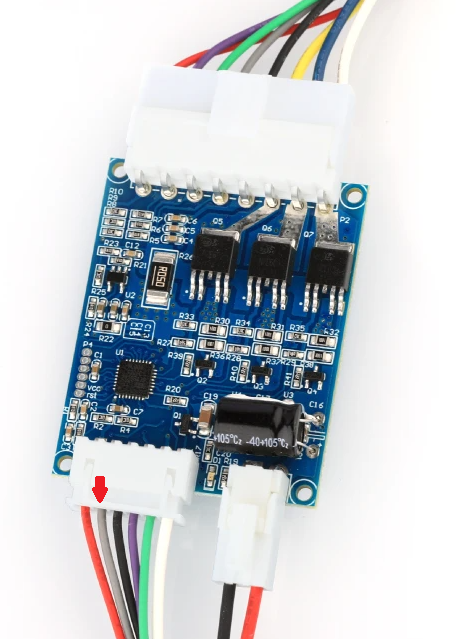
CPAP fan: A repurposed off-the-shelf compression fan utilized for remote part cooling operation. Having the fan remote from the printhead offloads this weight, reducing moving mass.
Officially short for Continuous Positive Airway Pressure, a form of medical treatment for sleep apnea.
• Make sure you set the correct voltage for your peripherals (fans, leds, etc)! Use the 5V, 12V and 24V jumpers.
Fans
The hot end fan connects to fan port FAN0.
The RSCS fans connect to fan port FAN1.
The enclosure exhaust fan connects to fan port FAN4.
The chamber circulation fan connects to fan port FAN9.
Sensors
The chamber thermistor plugs in to sensor port ADC_2. Use pins PF9 and -.
The bed thermistor plugs in to sensor port ADC_5. Use pins PC1 and -.
Other
The hot end heater cartridge connects to heater port HEAT0. Polarity does not matter here.
LED lighting connects to the FAN8 port, repurposed as a general PWM-controlled output. Make sure you set the correct voltage as required by your LEDs.
A filament runout sensor can be plugged in to the IO6 port. This is the plug under the ST-LINK port. For simple switch-based filament sensors, use pins PA8 and -.
The Vz330 Mellow kit does not come with a filament sensor. Please see your specific filament sensor’s documentation for instructions on how the sensor should be wired up.
CPAP
For powering the CPAP we hookup the Plug on the controlboard’s bottom right Directly to the 24V of your PSU. So Black goes to Negative 24V and Red goes to Positive 24V.
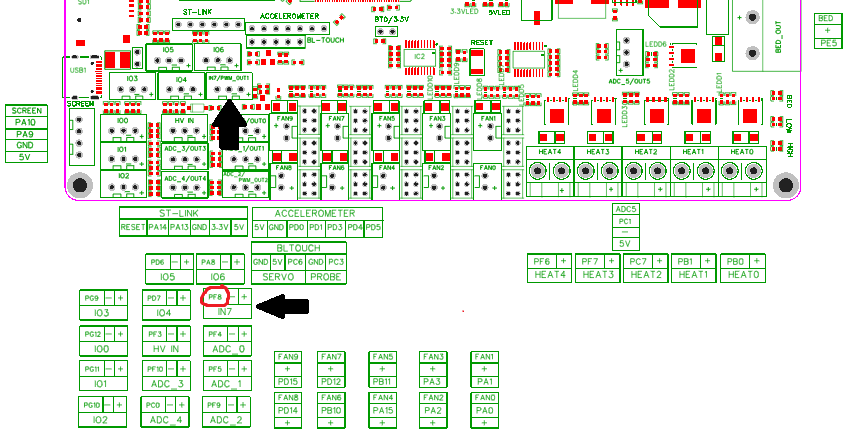
From the large plug on the bottom left we only need the Grey wire so the second from left. This wire gets plugged into port IN7, pin PF8 on the Motherboard.